
If you were a frequent traveler either for personal or business trip, you might have been wanting to unlock your phone and use the local cellphone plan to make phone calls, instead of using AT&T’s International Roaming plan. Believe me, you will be charged with premium rates. Last time I checked with AT&T, they will charge you $3.49/min to call landline phone in Indonesia, and $3.53/min to a cell phone when you are using AT&T’s sim card in Indonesia. It is much cheaper to just use local service provider.
Since I’m using AT&T service, I’ll tell you how to unlock your Blackberry as an AT&T customer.

Step 1 – Obtain the Unlock Code:
You must be with AT&T for at least 90 days. Call AT&T by dialing 611 and speak with AT&T’s customer representative. For my example, I told the person that this Christmas I might go back to Indonesia, so I need to get my phone unlocked to use my local sim card in Indonesia, instead of using AT&T’s. You can use similar reason depending on your needs. You might have to go overseas for business trip, visiting relatives, attending friend’s wedding, etc. He will then ask your name and last 4 digit of your social security number. If everything goes as planned, he will then give you the 16 digits unlock code, so make sure you have pen and paper ready. If they ask for your IMEI number, press *#06# on your mobile device to find your IMEI number immediately.
Step 2 – Options:
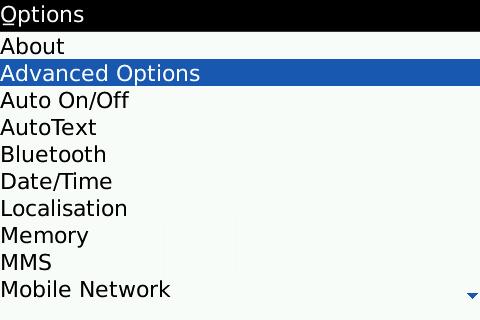
Go to Options and choose Advanced Options.
Step 3 – Sim Card:
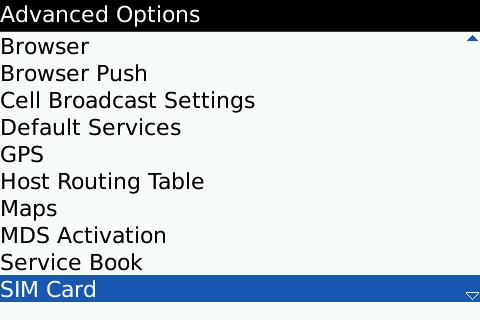
Select Sim Card option.
 Step 4 – Settings:
You will see under sim card option your phone ID number and your actual phone number.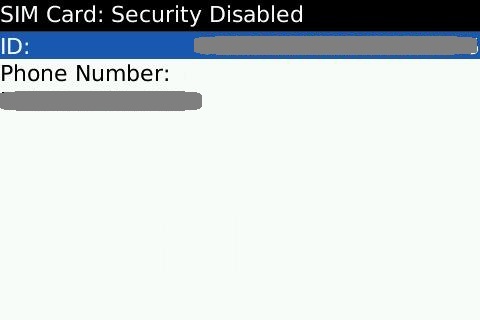
Step 5 – MEPD:
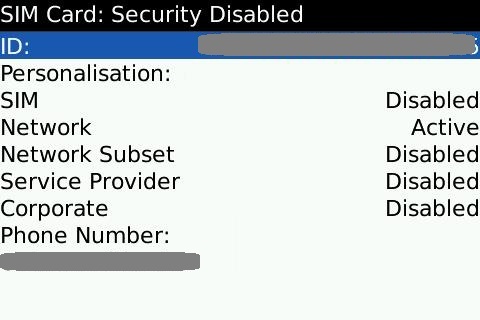
While you are still on this scress, type “MEPD” – without the quotes. As you can see below, that your Network locked is still active. This means that your phone usage is still locked to AT&T services only.
Step 6 – MEP2 and Entering the Unlock Code:
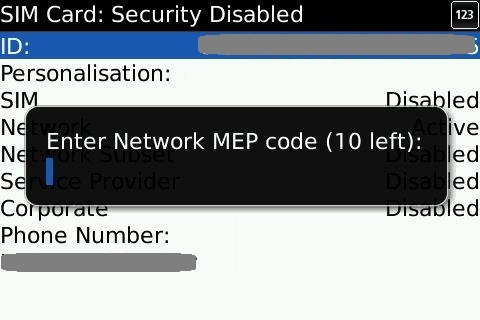
Type “MEP2” – without quotes. A prompt will pop up asking you to enter the Network MEP code. You will enter the unlock code that you got from the AT&T reps.
Step 7 – Final:
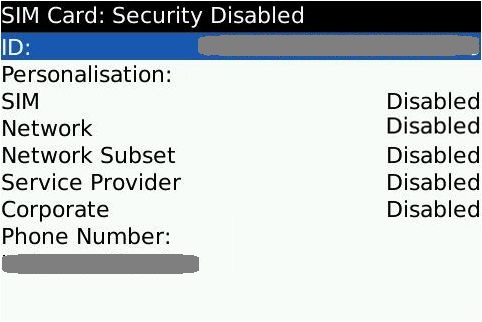
Check to see if the network lock has been disabled or not. If it has, congratulations….you just unlocked your phone.
Well…those are the steps that I did to unlock my Blackberry Bold 9000 from AT&T. If you have any questions, please leave them in the comment section below.
nThere are lot of ways in unlocking your cell phones.nRemember, for all phones there are limited number of attempts for entering unlockcode. Exceeding the limits may of course result in hard locking of the cell phone. Beware of the fact that you will come across free codes(fakes most) in the web. But yes you will find real ones too. However pay some $ n get the real codes. Dont tak, risk. I suggest you to go to unlockgenie.com (http://unlockgenie.com/) I got the code for my Blackberry Bold 9000 from this site it worked.nnThis is the website link for the online instructions for remote unlocking of Blackberry Bold 9000.
True….you could use third-party service like this one to get your unlock code. However, the method that I mentioned here is also safe, since it was done through AT&T. It was not a “fake codes.” If you have some exra money, you can buy the unlock codes from unlockgenie.com. Whatever works best for you. 😉
At&t loves to change your plan on a BB to a smart phone plan which is more expensive so if i unlock it will they know im using a BB still or no?
I have been on BB Internet plan for almost 2 years now and they didn’t change it to smart phone plan even though I unlocked my BB last year.nnI’m using Android phone right now, but I specifically requested AT&T to keep my BB Unlimited Internet plan, that I have had before, to enable me to switch back to my old BB and use its blackberry messenger, and AT&T had no problem with that even though they know that I am no longer using BB.
hi but i cant contact wid at&t custmercare
You should be able to contact them directly from your phone. Are you using AT&T? If you are, call “611” from your phone and you will be connected to the customer service.
I call AT&T, They told me Blackberry bold 9000 is not qualified for unlock.
How long you have been AT&T’s customer? I think after 6 months or so, yournshould be eligible for unlock. Did you use any “reasoning” for your unlockrnrequest?