
Wibiya Toolbar Application Fail to Load Problem

by Steven Sentosa on November 14, 2009

I just recently installed Wibiya toolbar on my personal blog, and faced with few problems where few of the applications from the toolbar did not load properly: RSS feed, Facebook Community, and Twitter application.


wibiya-twitter-fail

Wibiya Twitter application fail to load


With little bit of research, I finally solved the problem.

wibiya-twitter-success

Wibiya Twitter application success to load


This is actually simple problem. What actually happened is that the jQuery installed on my blog is causing the error. To fix this, just add this code somewhere after the BODY tag:

<script src=’http://ajax.googleapis.com/ajax/libs/jquery/1.3.2/jquery.min.js’ type=’text/javascript’></script>

You can put this piece of code anywhere between the body content. For me, since I’m using WordPress Arclite theme, I just added the code to the footer using Arclite plugin setup.

[UPDATED 15 NOVEMBER 2009]
Wibiya team member just got back to me this morning and suggested me several solutions. This particular solution works the best for me, because it solves the jQuery conflict between Wibiya toolbar and Lightbox plugin, and it is specific to the WordPress theme that I’m using. Here’s the solution.

Apparently it has something to do with the WordPress themes that I’m using, which is Arclite. It’s jQuery javascript mess up the Wibiya Toolbar and Lightbox plugin. The solution here is to edit Arclite Javascript, that can be found at yourdomain.com/wp-content/themes/arclite/js/arclite.js.

Find this line: // fixes for IE-7 cleartype bug on fade in/out, and delete (or comment out) these three sections:
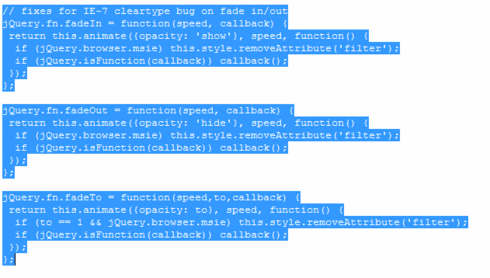
arclite-javascript

It should solve your problem, if you were having the same Wibiya toolbar problem like I had. Let me know if it works for you or not.

Related posts:

  1. IntenseDebate – WordPress Plugin Commenting System I just found out about IntenseDebate about couple weeks ago,...

  • Steven Sentosa

    Apparently, my problem is not completely over. I have another problem now. Wibiya toolbar works just fine, but my WP Lightbox 2 plugin is not working now. I'm not sure how to solve this. I have already submitted problem ticket to Wibiya forum, so hopefully they will respond my question soon. :(

  • Steven Sentosa

    One way to by pass this problem is by using WP Nextgen Gallery plugin. Instead of using the native picture uploader from WordPress, you need to upload your images to NextGen Gallery and attach your pictures using NextGen Gallery. Using this way, you will still enjoy the elegant lightbox effect when you click your image, because I think NextGen Gallery uses different jQuery that is not interfering with Wibiya's jQuery.

  • http://techshadow.co.cc/ Eonhari

    Where exactly should I add the line – <script src=’http://ajax.googleapis.com/ajax/libs/jquery/1.3.2/jquery.min.js’ type=’text/javascript’></script> – ?
    Is it in the Footer.php in editor ?
    Im using theme called mystique – of the same type & of the same designer .
    !?!? HELP ?!?!
    http://techshadow.co.cc/

  • Steven Sentosa

    You can add the code anywhere after the <BODY> tag. My suggestion is to add the code at the end of your theme's index.php. I have never used mystique theme, but it's usually located at wp-content/themes/[your theme].

  • http://techshadow.co.cc/ Eonhari

    Thank You very much …
    It worked !!!

  • Steven Sentosa

    I'm glad that I can be a help for you. :)

  • http://www.facebook.com/kyriakoszannikos Kyriakos Zannikos

    Hey Hi!
    I have the same problem with the mystique theme (wordpress). I did what you suggesyed (added the script code on the footer) but did not work…

  • Steven Sentosa

    Have you tried to put the code in your index.php of your theme? Put it after the <BODY> tag. @Eonhari seems to have his code work by doing this.

  • http://internetprofitbiz.com/blog/ Steven Sentosa

    Have you tried to put the code in your index.php of your theme? Put it after the tag. @Eonhari seems to have his code work by doing this.

  • http://techshadow.co.cc/ Eonhari

    Um…sorry but it worked because I had turned off jQuery ! Then when I switched it on it stuck again !

  • Steven Sentosa

    Hmm….it must mean that both jQuery conflict with each other, so you can only use one or the other.

  • http://techshadow.co.cc/ Eonhari

    Um…sorry but it worked because I had turned off jQuery ! Then when I switched it on it stuck again !

  • http://techshadow.co.cc/ Eonhari

    Um…sorry but it worked because I had turned off jQuery ! Then when I switched it on it stuck again !

  • http://techshadow.co.cc/ Eonhari

    Um…sorry but it worked because I had turned off jQuery ! Then when I switched it on it stuck again !

  • http://techshadow.co.cc/ Eonhari

    Um…sorry but it worked because I had turned off jQuery ! Then when I switched it on it stuck again !

  • http://techshadow.co.cc/ Eonhari

    Um…sorry but it worked because I had turned off jQuery ! Then when I switched it on it stuck again !

  • http://techshadow.co.cc/ Eonhari

    Um…sorry but it worked because I had turned off jQuery ! Then when I switched it on it stuck again !

  • http://techshadow.co.cc/ Eonhari

    Um…sorry but it worked because I had turned off jQuery ! Then when I switched it on it stuck again !

  • http://techshadow.co.cc/ Eonhari

    Um…sorry but it worked because I had turned off jQuery ! Then when I switched it on it stuck again !

  • http://techshadow.co.cc/ Eonhari

    Um…sorry but it worked because I had turned off jQuery ! Then when I switched it on it stuck again !

  • http://techshadow.co.cc/ Eonhari

    Um…sorry but it worked because I had turned off jQuery ! Then when I switched it on it stuck again !

  • http://techshadow.co.cc/ Eonhari

    Um…sorry but it worked because I had turned off jQuery ! Then when I switched it on it stuck again !

  • http://techshadow.co.cc/ Eonhari

    Um…sorry but it worked because I had turned off jQuery ! Then when I switched it on it stuck again !

  • http://techshadow.co.cc/ Eonhari

    Um…sorry but it worked because I had turned off jQuery ! Then when I switched it on it stuck again !

  • http://techshadow.co.cc/ Eonhari

    Um…sorry but it worked because I had turned off jQuery ! Then when I switched it on it stuck again !

  • http://techshadow.co.cc/ Eonhari

    Um…sorry but it worked because I had turned off jQuery ! Then when I switched it on it stuck again !

  • http://techshadow.co.cc/ Eonhari

    Um…sorry but it worked because I had turned off jQuery ! Then when I switched it on it stuck again !

  • http://techshadow.co.cc/ Eonhari

    Um…sorry but it worked because I had turned off jQuery ! Then when I switched it on it stuck again !

  • http://techshadow.co.cc/ Eonhari

    Um…sorry but it worked because I had turned off jQuery ! Then when I switched it on it stuck again !

  • http://techshadow.co.cc/ Eonhari

    Um…sorry but it worked because I had turned off jQuery ! Then when I switched it on it stuck again !

  • http://techshadow.co.cc/ Eonhari

    Um…sorry but it worked because I had turned off jQuery ! Then when I switched it on it stuck again !

  • http://techshadow.co.cc/ Eonhari

    Um…sorry but it worked because I had turned off jQuery ! Then when I switched it on it stuck again !

  • http://techshadow.co.cc/ Eonhari

    Um…sorry but it worked because I had turned off jQuery ! Then when I switched it on it stuck again !

  • http://internetprofitbiz.com/blog/ Steven Sentosa

    Hmm….it must mean that both jQuery conflict with each other, so you can only use one or the other.

  • http://internetprofitbiz.com/blog/ Steven Sentosa

    Hmm….it must mean that both jQuery conflict with each other, so you can only use one or the other.

  • http://internetprofitbiz.com/blog/ Steven Sentosa

    Hmm….it must mean that both jQuery conflict with each other, so you can only use one or the other.

  • http://internetprofitbiz.com/blog/ Steven Sentosa

    Hmm….it must mean that both jQuery conflict with each other, so you can only use one or the other.

  • http://internetprofitbiz.com/blog/ Steven Sentosa

    Hmm….it must mean that both jQuery conflict with each other, so you can only use one or the other.

  • http://internetprofitbiz.com/blog/ Steven Sentosa

    Hmm….it must mean that both jQuery conflict with each other, so you can only use one or the other.

  • http://internetprofitbiz.com/blog/ Steven Sentosa

    Hmm….it must mean that both jQuery conflict with each other, so you can only use one or the other.

  • http://internetprofitbiz.com/blog/ Steven Sentosa

    Hmm….it must mean that both jQuery conflict with each other, so you can only use one or the other.

  • http://internetprofitbiz.com/blog/ Steven Sentosa

    Hmm….it must mean that both jQuery conflict with each other, so you can only use one or the other.

  • http://internetprofitbiz.com/blog/ Steven Sentosa

    Hmm….it must mean that both jQuery conflict with each other, so you can only use one or the other.

  • http://internetprofitbiz.com/blog/ Steven Sentosa

    Hmm….it must mean that both jQuery conflict with each other, so you can only use one or the other.

  • http://internetprofitbiz.com/blog/ Steven Sentosa

    Hmm….it must mean that both jQuery conflict with each other, so you can only use one or the other.

  • http://internetprofitbiz.com/blog/ Steven Sentosa

    Hmm….it must mean that both jQuery conflict with each other, so you can only use one or the other.

  • http://internetprofitbiz.com/blog/ Steven Sentosa

    Hmm….it must mean that both jQuery conflict with each other, so you can only use one or the other.

  • http://internetprofitbiz.com/blog/ Steven Sentosa

    Hmm….it must mean that both jQuery conflict with each other, so you can only use one or the other.

  • http://internetprofitbiz.com/blog/ Steven Sentosa

    Hmm….it must mean that both jQuery conflict with each other, so you can only use one or the other.

  • http://internetprofitbiz.com/blog/ Steven Sentosa

    Hmm….it must mean that both jQuery conflict with each other, so you can only use one or the other.

  • http://internetprofitbiz.com/blog/ Steven Sentosa

    Hmm….it must mean that both jQuery conflict with each other, so you can only use one or the other.

  • http://internetprofitbiz.com/blog/ Steven Sentosa

    Hmm….it must mean that both jQuery conflict with each other, so you can only use one or the other.

  • http://internetprofitbiz.com/blog/ Steven Sentosa

    Hmm….it must mean that both jQuery conflict with each other, so you can only use one or the other.

  • http://internetprofitbiz.com/blog/ Steven Sentosa

    Hmm….it must mean that both jQuery conflict with each other, so you can only use one or the other.

  • http://internetprofitbiz.com/blog/ Steven Sentosa

    Hmm….it must mean that both jQuery conflict with each other, so you can only use one or the other.

blog comments powered by Disqus

Previous post:

Next post: